Email Marketing vs Email Automation Key Differences, Benefits, and How to Choose the Right Strategy in 2026

Introduction
Email remains one of the most effective digital marketing channels, helping businesses connect with customers, generate leads, and increase sales. Despite the rise of social media and messaging apps, email continues to deliver an impressive return on investment because it provides a direct and personalized communication channel.
However, many marketers use the terms email marketing and email automation interchangeably. While they are closely related, they serve different purposes. Understanding the distinction is essential for businesses looking to build stronger customer relationships and create more effective marketing campaigns.
In this guide, we’ll explore the differences between email marketing and email automation, explain how each strategy works, and help you determine which approach best fits your business goals.
What Is Email Marketing?
Email marketing is the practice of sending promotional, educational, or informational emails to a group of subscribers. These emails are usually created and scheduled manually for a specific audience.
Businesses use email marketing to:
- Promote products or services
- Announce company news
- Share blog posts
- Offer discounts and promotions
- Launch new products
- Build customer loyalty
- Generate repeat sales
The primary goal of email marketing is to keep subscribers engaged while encouraging them to take action, such as making a purchase, registering for an event, or visiting a website.
Unlike automated campaigns, traditional email marketing often requires marketers to decide when emails should be sent and which audience should receive them.
What Is Email Automation?
Email automation is a system that automatically sends emails when predefined conditions or customer actions occur.
Instead of manually creating every campaign, businesses build automated workflows that respond to user behavior.
Examples include:
- Welcome emails after signup
- Password reset emails
- Order confirmations
- Shipping updates
- Birthday greetings
- Cart abandonment reminders
- Product recommendations
- Re-engagement campaigns
Once an automation workflow is configured, it can continue running with minimal manual effort while delivering relevant messages at the right time.
Automation helps businesses maintain consistent communication without having to send each email individually.
Email Marketing vs Email Automation: The Main Difference
Although both methods rely on email communication, their approach is quite different.
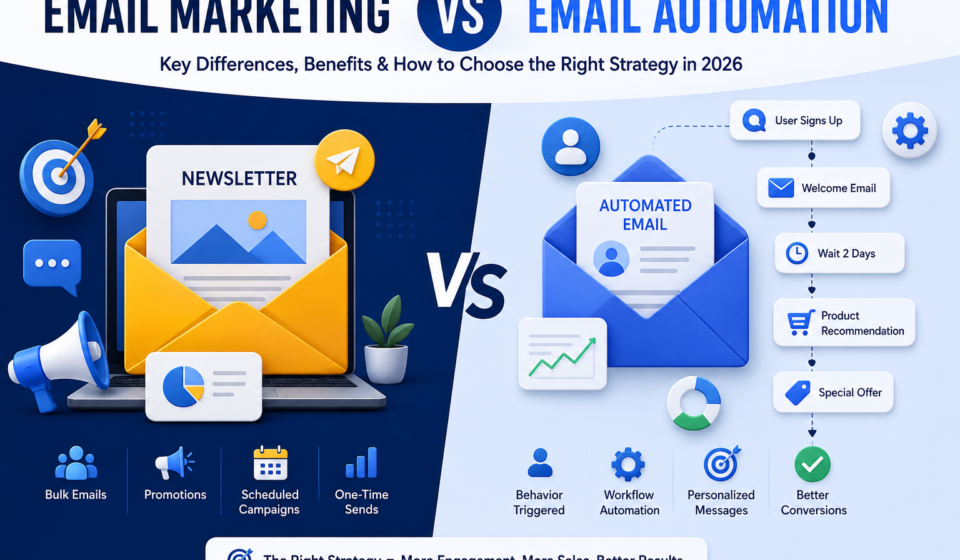
Email Marketing focuses on sending campaigns to a selected audience at scheduled times.
Email Automation focuses on sending personalized emails automatically when users perform specific actions.
Think of it this way:
- Email marketing is campaign-driven.
- Email automation is behavior-driven.
Many successful companies combine both strategies to maximize customer engagement and improve conversion rates.
Quick Comparison Table
| Feature | Email Marketing | Email Automation |
| Sending Method | Manual or scheduled | Automatic |
| Trigger | Marketing calendar | Customer behavior |
| Personalization | Basic to moderate | Highly personalized |
| Time Required | Higher | Lower after setup |
| Best For | Promotions and newsletters | Customer journeys |
| Scalability | Moderate | Excellent |
| Customer Experience | Good | More personalized |
| Long-Term Efficiency | Moderate | High |
How Email Marketing Works
Traditional email marketing usually follows these steps:
1. Build an Email List
Businesses collect email addresses through:
- Website forms
- Landing pages
- Newsletters
- Lead magnets
- Online stores
- Webinars
Growing a permission-based email list is the foundation of every successful campaign.
2. Segment the Audience
Instead of sending identical emails to everyone, marketers divide subscribers into different groups.
Common segmentation methods include:
- Age
- Location
- Purchase history
- Interests
- Industry
- Customer type
- Engagement level
Segmentation improves relevance and often increases open rates and conversions.
3. Create Valuable Content
Effective marketing emails provide value instead of simply promoting products.
Examples include:
- Helpful tips
- Educational guides
- Industry updates
- Exclusive discounts
- Product announcements
- Customer success stories
Well-written emails encourage subscribers to remain engaged over time.
4. Design the Campaign
Marketers choose:
- Subject line
- Header image
- Call-to-action buttons
- Layout
- Brand colors
- Mobile responsiveness
An attractive design improves readability and user experience across desktop and mobile devices.
5. Schedule and Send
Once everything is ready, the campaign is scheduled for a specific date and time.
Performance is then measured using metrics such as:
- Open rate
- Click-through rate
- Conversion rate
- Bounce rate
- Unsubscribe rate
These insights help improve future campaigns.
How Email Automation Works
Email automation follows a different process.
Instead of manually sending messages, businesses build workflows based on customer actions.
A basic automation process includes:
Step 1: Choose a Trigger
Common triggers include:
- User signs up
- Product purchased
- Cart abandoned
- Link clicked
- Email opened
- Subscription renewed
- Account created
Step 2: Create the Workflow
A workflow determines which emails will be sent and when.
For example:
New Subscriber
↓
Welcome Email
↓
Wait Two Days
↓
Educational Email
↓
Wait Three Days
↓
Special Offer
↓
Follow-Up Email
This journey happens automatically for every new subscriber.
Step 3: Personalize the Experience
Automation platforms can personalize emails using customer information such as:
- First name
- Company name
- Previous purchases
- Browsing history
- Preferred products
- Geographic location
Personalization helps businesses deliver more relevant messages, improving customer engagement and satisfaction.
Why Businesses Use Both Strategies
Rather than choosing one approach over the other, many organizations combine email marketing and automation to create a complete communication strategy.
For example:
- A company may send a monthly newsletter using traditional email marketing.
- At the same time, it may use automation for welcome emails, abandoned cart reminders, and post-purchase follow-ups.
This combination allows businesses to stay connected with customers through scheduled campaigns while also responding automatically to individual customer actions.
In the next section, we’ll explore the advantages and disadvantages of each approach, real-world use cases, common mistakes to avoid, and practical tips for building a successful email strategy in 2026.
Benefits of Email Marketing
Traditional email marketing continues to be one of the most effective ways to communicate with customers. When planned correctly, it helps businesses increase visibility, build trust, and generate consistent revenue.
1. Direct Communication
Unlike social media platforms, where algorithms determine who sees your content, emails are delivered directly to subscribers’ inboxes. This gives businesses greater control over their messaging and timing.
2. Cost-Effective Marketing
Compared to paid advertising, email marketing is relatively affordable. Businesses can reach thousands of subscribers without spending heavily on advertising costs, making it especially valuable for startups and small businesses.
3. Strong Brand Awareness
Regular newsletters and promotional campaigns keep your brand visible. Even when subscribers are not ready to purchase immediately, consistent communication helps ensure they remember your business when the need arises.
4. Easy Performance Tracking
Most email marketing platforms provide detailed analytics, including:
- Open rates
- Click-through rates
- Conversion rates
- Bounce rates
- Unsubscribe rates
These metrics help marketers identify successful campaigns and improve future performance.
5. Flexible Campaign Types
Email marketing supports various campaign formats, including:
- Weekly newsletters
- Promotional offers
- Product launches
- Seasonal sales
- Event invitations
- Educational content
- Customer surveys
This flexibility allows businesses to adapt their messaging to different goals and audiences.
Benefits of Email Automation
Automation takes email marketing a step further by delivering personalized messages automatically based on customer behavior.
1. Saves Time
Once workflows are created, emails are sent automatically without requiring manual intervention. This allows marketing teams to focus on strategy and content creation rather than repetitive tasks.
2. Delivers Timely Messages
Automated emails are triggered at the right moment, such as immediately after a user signs up or abandons a shopping cart. Timely communication often leads to higher engagement and better customer experiences.
3. Better Personalization
Automation tools can use customer data to personalize emails with:
- Recipient names
- Product recommendations
- Purchase history
- Location-based offers
- Behavioral insights
Relevant content increases the likelihood that recipients will open emails and take action.
4. Improves Customer Retention
Automated follow-up emails help businesses stay connected with customers after a purchase. These messages can include onboarding tips, product recommendations, feedback requests, or loyalty rewards, encouraging repeat business.
5. Higher Conversion Rates
Because automated emails are behavior-based, they often achieve higher open and click-through rates than general marketing campaigns. Customers receive messages that match their interests and actions, making them more likely to convert.
Common Types of Automated Email Campaigns
Businesses use automation for many different customer interactions. Some of the most common workflows include:
Welcome Email Series
A welcome sequence introduces new subscribers to your brand and sets expectations for future communication. It may include:
- A thank-you message
- Company introduction
- Helpful resources
- Featured products or services
Abandoned Cart Emails
When a shopper adds products to their cart but leaves without completing the purchase, an automated reminder can encourage them to return and finish the transaction.
Lead Nurturing Campaigns
Lead nurturing emails provide valuable educational content over time, helping potential customers learn about your products or services before making a purchasing decision.
Re-Engagement Campaigns
These emails target inactive subscribers who have not opened or clicked emails for an extended period. The goal is to rebuild interest before removing inactive contacts from the mailing list.
Post-Purchase Follow-Up
After a customer completes an order, businesses often send:
- Order confirmations
- Shipping updates
- Product usage tips
- Review requests
- Cross-sell recommendations
These emails strengthen customer relationships and encourage repeat purchases.
When Should You Use Email Marketing?
Traditional email marketing works best when you want to communicate with a broad audience at a specific time.
Examples include:
- Holiday promotions
- Monthly newsletters
- Company announcements
- Product launches
- Limited-time discounts
- Industry news updates
These campaigns are ideal for delivering the same core message to a large group of subscribers.
When Should You Use Email Automation?
Automation is the better choice when communication depends on customer actions or lifecycle stages.
Common scenarios include:
- New subscriber onboarding
- Account verification
- Welcome sequences
- Abandoned cart reminders
- Subscription renewals
- Birthday greetings
- Customer feedback requests
- Re-engagement campaigns
Automation ensures every customer receives relevant information without requiring manual effort.
Common Mistakes to Avoid
Whether using traditional email marketing or automation, avoiding these common mistakes can improve campaign performance.
Buying Email Lists
Purchased email lists often result in poor engagement, spam complaints, and damaged sender reputation. Always build your list organically with user consent.
Ignoring Mobile Optimization
A large percentage of emails are opened on smartphones. Responsive layouts, readable fonts, and clear call-to-action buttons are essential for a positive user experience.
Sending Too Many Emails
Excessive email frequency can overwhelm subscribers and increase unsubscribe rates. Focus on delivering valuable content rather than sending messages too often.
Using Generic Subject Lines
The subject line is the first thing recipients see. Clear, relevant, and engaging subject lines significantly improve open rates.
Neglecting Segmentation
Sending the same email to every subscriber reduces relevance. Segmenting your audience based on interests, demographics, or behavior helps improve engagement and conversions.
Best Practices for Success
To maximize the effectiveness of your email strategy, consider the following recommendations:
- Build a permission-based email list.
- Segment your audience regularly.
- Write compelling subject lines.
- Keep content concise and valuable.
- Include a clear call to action.
- Personalize messages whenever possible.
- Test different sending times.
- Monitor campaign performance and optimize continuously.
- Maintain a consistent brand voice.
- Remove inactive subscribers periodically to improve deliverability.
Choosing the Right Email Platform
The right email platform depends on your business size, marketing goals, and automation needs.
When comparing platforms, look for features such as:
- Drag-and-drop email builder
- Automation workflows
- Audience segmentation
- A/B testing
- Analytics dashboard
- CRM integration
- E-commerce integrations
- Landing page builder
- Template library
- Scalability for future growth
Selecting a platform that supports both traditional campaigns and advanced automation provides greater flexibility as your business expands.
Can Email Marketing and Email Automation Work Together?
Absolutely. The most successful businesses don’t choose one strategy over the other—they combine both to create a complete customer communication system.
Think of email marketing as your planned communication and email automation as your intelligent assistant that responds to customer actions.
For example, a software company could use:
- Monthly newsletters to share product updates.
- Automated welcome emails for new subscribers.
- Trial expiration reminders.
- Product onboarding sequences.
- Customer satisfaction surveys.
- Renewal reminders.
- Promotional campaigns during seasonal sales.
By integrating both approaches, businesses can communicate consistently while delivering personalized experiences at every stage of the customer journey.
Sample Customer Journey
Here’s an example of how email marketing and automation can work together.
Day 1
A visitor downloads a free eBook.
↓
Automatic Welcome Email
↓
Day 2
Educational email explaining your product.
↓
Day 5
Customer success story.
↓
Day 8
Invitation to schedule a product demo.
↓
Day 14
Limited-time promotional offer.
↓
Monthly Newsletter
↓
Product Updates
↓
Renewal Reminder
↓
Customer Feedback Request
This type of workflow keeps subscribers engaged without requiring marketers to send every message manually.
Which Strategy Is Better?
The answer depends on your business objectives.
Choose Email Marketing If You Want To:
- Send newsletters
- Promote seasonal sales
- Announce new products
- Share company news
- Reach all subscribers simultaneously
Choose Email Automation If You Want To:
- Save time
- Personalize communication
- Increase customer engagement
- Recover abandoned carts
- Nurture leads automatically
- Improve customer retention
For most organizations, combining both methods delivers the best long-term results.
Key Metrics to Measure Success
Regardless of your strategy, monitoring performance is essential. Some of the most important email marketing metrics include:
Open Rate
Measures how many recipients opened your email.
A compelling subject line and recognizable sender name can improve this metric.
Click-Through Rate (CTR)
Shows the percentage of recipients who clicked a link within your email.
Higher CTR often indicates that your content and call-to-action are relevant to your audience.
Conversion Rate
Tracks how many recipients completed your desired action, such as:
- Purchasing a product
- Booking a demo
- Registering for a webinar
- Downloading a resource
This is one of the most valuable indicators of campaign effectiveness.
Bounce Rate
Bounce rate measures emails that could not be delivered.
Maintaining a clean email list helps reduce bounce rates and protects your sender reputation.
Unsubscribe Rate
A high unsubscribe rate may indicate that your content is not meeting subscriber expectations or that emails are being sent too frequently.
Regularly reviewing this metric can help improve future campaigns.
Future Trends in Email Marketing and Automation
As technology evolves, email continues to become more intelligent and personalized. Businesses adopting these trends can improve customer engagement and marketing efficiency.
Some emerging developments include:
AI-Powered Personalization
Artificial intelligence can analyze customer behavior to recommend products, personalize content, and optimize sending times.
Predictive Analytics
Advanced analytics help marketers identify customers who are most likely to purchase, unsubscribe, or become inactive, enabling more targeted campaigns.
Interactive Emails
Modern email designs increasingly include interactive features such as image carousels, surveys, quizzes, and embedded forms, allowing users to engage without leaving their inbox.
Privacy-Focused Marketing
With growing concerns around data privacy, businesses are placing greater emphasis on obtaining user consent, protecting customer information, and complying with privacy regulations.
Smarter Automation
Automation platforms continue to evolve, offering more advanced workflow builders, customer segmentation, and integrations with CRM and e-commerce systems.
Frequently Asked Questions
Is email automation replacing email marketing?
No. Email automation enhances email marketing rather than replacing it. Most businesses benefit from using both strategies together.
Is automation only for large businesses?
No. Small businesses can also benefit from automation by saving time, improving customer communication, and delivering personalized experiences with limited resources.
Which strategy generates better conversions?
Behavior-triggered automated emails often achieve higher engagement because they are based on customer actions. However, well-planned marketing campaigns also play an important role in generating awareness and sales.
Can beginners use email automation?
Yes. Many modern email marketing platforms provide user-friendly automation builders with pre-designed templates, making it easy for beginners to create workflows.
How often should marketing emails be sent?
The ideal frequency depends on your audience and business type. Consistency is generally more important than volume. Businesses should focus on delivering relevant, valuable content rather than sending emails too frequently.
Final Thoughts
Email remains one of the most effective channels for building customer relationships and driving business growth. While email marketing focuses on scheduled campaigns that reach broad audiences, email automation delivers personalized messages based on customer behavior.
Rather than viewing them as competing strategies, businesses should see them as complementary tools. Marketing campaigns help maintain visibility and communicate important updates, while automation ensures customers receive timely, relevant messages throughout their journey.
By combining both approaches, organizations can improve engagement, strengthen customer loyalty, increase efficiency, and create more meaningful interactions with their audience. Whether you’re a startup, an online retailer, or an established enterprise, investing in a balanced email strategy can support long-term marketing success in 2026 and beyond.